Profiles
One address per purpose, so each AI app sees only the accounts it needs.
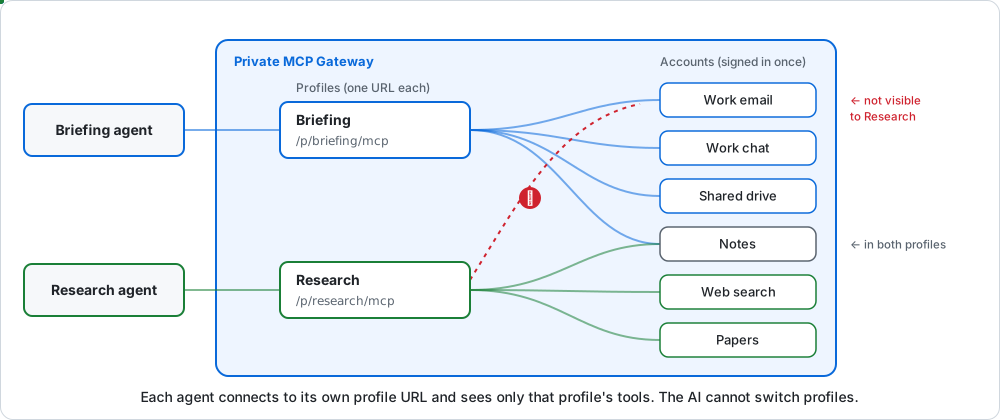
A profile is a named set of accounts with its own address and token. Each AI app connects to one profile.
Why use more than one
- Less risk. A research assistant doesn't need your mailbox. If it isn't in the profile, the AI can't reach it, whatever it's told.
- Different privacy. A profile for a local model can turn masking off; one for a cloud AI keeps it on.
- Different rules. A profile for drafting can ask before every send; one for reading can be read-only.
- Better tool choice. Fewer tools means the AI picks the right one more often.
Make one
- Open Profiles and choose New profile.
- Name it and tick its accounts.
- Pick a privacy level and an approval preset. The defaults are a safe start.
- Connect your app and choose the new profile.
The All profile
Built in. It always holds every account. Use it for one connection to everything, or leave it unused once you have your own profiles.
Profile settings
| Setting | What it does | More |
|---|---|---|
| Privacy | How much personal data is masked | Privacy levels |
| Preset | When pMCPg asks before a call | Approvals |
| Read-only | Only tools marked read-only can run | Approvals |
Deleting a profile stops apps that use its address. Its accounts stay.